About NoRoot Firewall
| Name: | NoRoot Firewall |
| Price: | Free |
| Version: | 4.0.2 |
| Author: | Grey Shirts |
| Category: | Productivity |
| Package: | app.greyshirts.firewall |
NoRoot Firewall app
Brief
NoRoot Firewall is a free and lightweight firewall app for Android devices that does not require root access. It allows you to create filter rules based on IP address, host name, or domain name to control which apps have access to the internet. You can also allow or deny specific connections of an app, such as background data or Wi-Fi only connections.
Updates
The most recent update for NoRoot Firewall was released on August 4, 2023. This update included the following changes:
- Added support for Android 13
- Fixed a bug that prevented some apps from connecting to the internet
- Improved performance and stability
Features
- Block or allow apps from accessing the internet
- Create filter rules based on IP address, host name, or domain name
- Allow or deny specific connections of an app, such as background data or Wi-Fi only connections
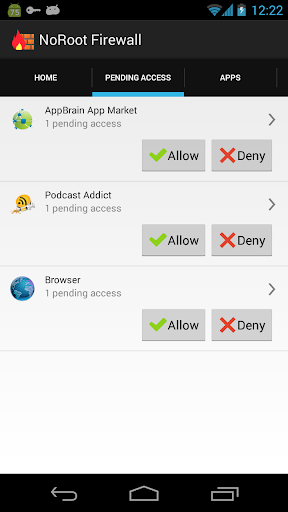
- Receive notifications when an app tries to access the internet
- Log all incoming and outgoing traffic
- Use whitelists and blacklists to control which apps have access to the internet
- Backup and restore your settings
Pros
- Free and easy to use
- No root access required
- Lightweight and does not drain your battery
- Comprehensive set of features
- Regular updates
Cons
- Not as powerful as some root-based firewalls
- Cannot block ads
- May cause some apps to not work properly
Conclusion
NoRoot Firewall is a great option for users who want to control which apps have access to the internet without rooting their device. It is easy to use and has a comprehensive set of features. However, it is not as powerful as some root-based firewalls and cannot block ads.
Additional notes
- NoRoot Firewall is available on the Google Play Store.
- It is important to note that blocking apps from accessing the internet may cause them to not work properly. It is recommended to test apps thoroughly after blocking them to make sure they still work as expected.
- If you are unsure about how to use NoRoot Firewall, there are many tutorials and resources available online.