About YouTube Kids
| Name: | YouTube Kids |
| Price: | Free |
| Version: | 10.36.1 |
| Author: | Google LLC |
| Category: | entertainment |
| Package: | com.google.android.apps.youtube.kids |
Overview
YouTube Kids is a family-friendly app designed by Google to provide a safer and more controlled environment for children to explore video content. Tailored for kids aged 3–12, it offers curated videos, channels, and playlists that prioritize age-appropriate entertainment, learning, and creativity. Available on Android via Google Play, the app balances accessibility with robust parental controls.
Brief
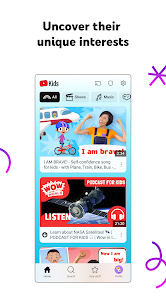
As a simplified version of YouTube, YouTube Kids filters out mature content and delivers a visually engaging interface with larger icons and intuitive navigation. It aims to foster independent exploration while giving parents tools to customize their child’s experience, from setting screen-time limits to blocking specific content.
How to Use
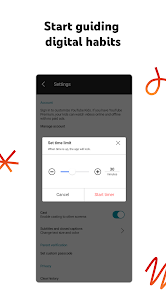
After downloading the app, parents set up a profile by selecting their child’s age group (Preschool, Younger, Older, or Custom). They can enable search functions or restrict content to pre-approved channels. A timer allows daily usage limits, and the watch history feature lets parents review viewed videos. Kids browse categories like "Learning," "Music," or "Shows" using simple swipe gestures.
Features
- Content Filtering: Algorithms and human reviewers curate videos suitable for children.
- Parental Controls: Customize profiles, block videos/channels, and disable search.
- Screen Time Management: Set viewing limits with a built-in timer.
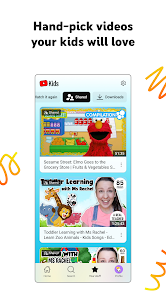
- Watch History: Monitor what your child watches.
- Diverse Content Library: Educational videos, cartoons, DIY crafts, and family vlogs.
Pros
- Strong focus on child safety and content moderation.
- Easy-to-navigate interface for kids and parents.
- Educational content from trusted creators like PBS Kids and National Geographic.
- Multiple profiles support families with siblings.
- Free to use with optional ad-supported content (ads are filtered for appropriateness).
Cons
- Ads in some regions may still slip through filters, causing distractions.
- Occasional inappropriate content may bypass algorithms, requiring parental vigilance.
- Limited control over video recommendations.
- No web version—app access only.
Conclusion
YouTube Kids is a valuable tool for parents seeking a safer digital space for children to learn and play. While its content filters and parental controls are impressive, occasional ads and algorithmic hiccups mean supervision is still necessary. For families prioritizing both fun and safety, it’s a solid choice—just stay engaged with your child’s viewing habits to maximize the app’s benefits.